Stop drowning in emails.
Run your inbox like a system.
MailBridge organizes, prioritizes, and handles your emails so you can focus on actually running your business.
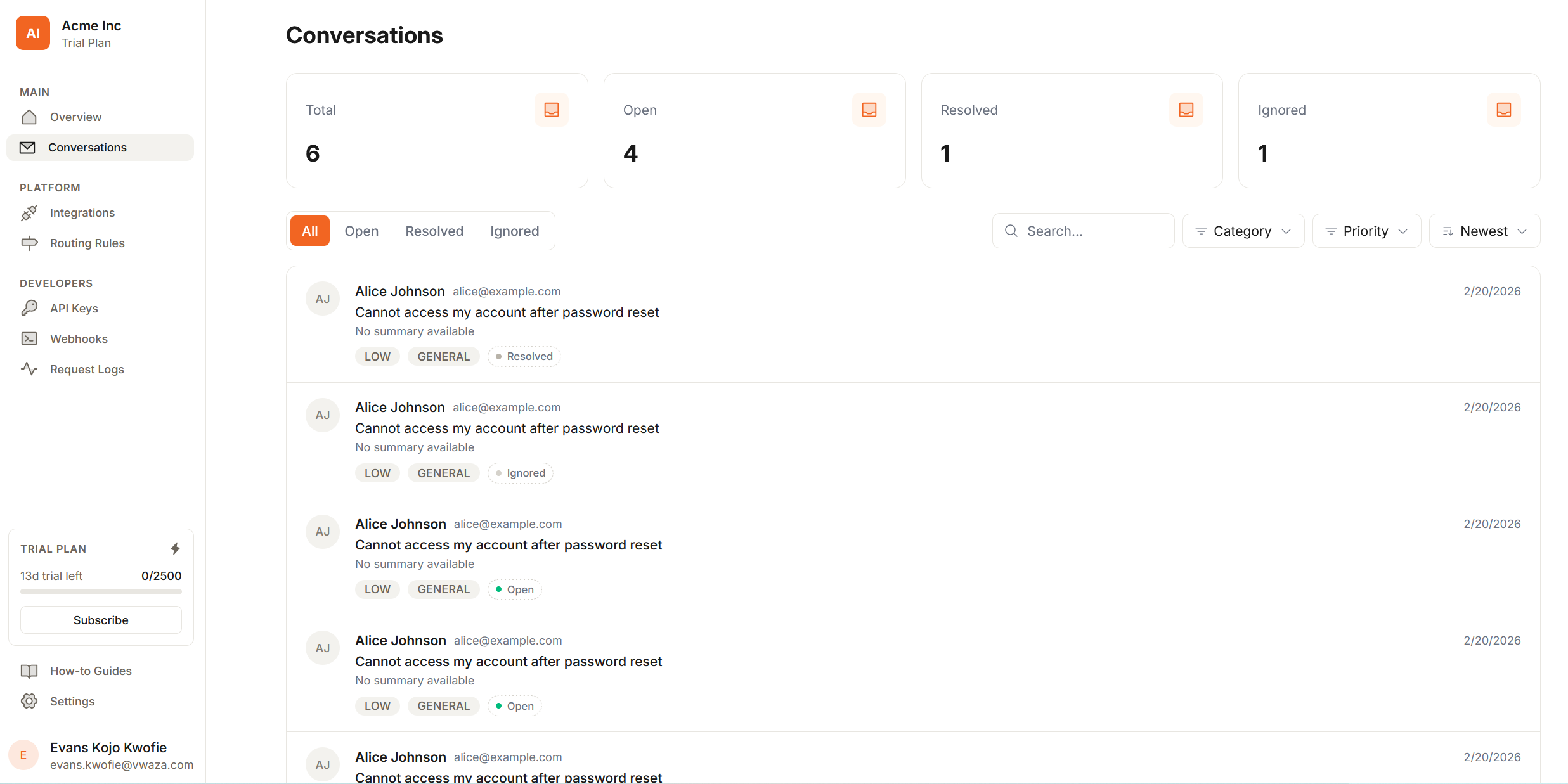
How it works
Email in. Action out.
Your team stops missing emails. Customers stop waiting. Nothing changes about how they contact you.
01
Forward your inbox
Add a forwarding rule from your support address to your unique MailBridge address. No code required, takes about 30 seconds.
02
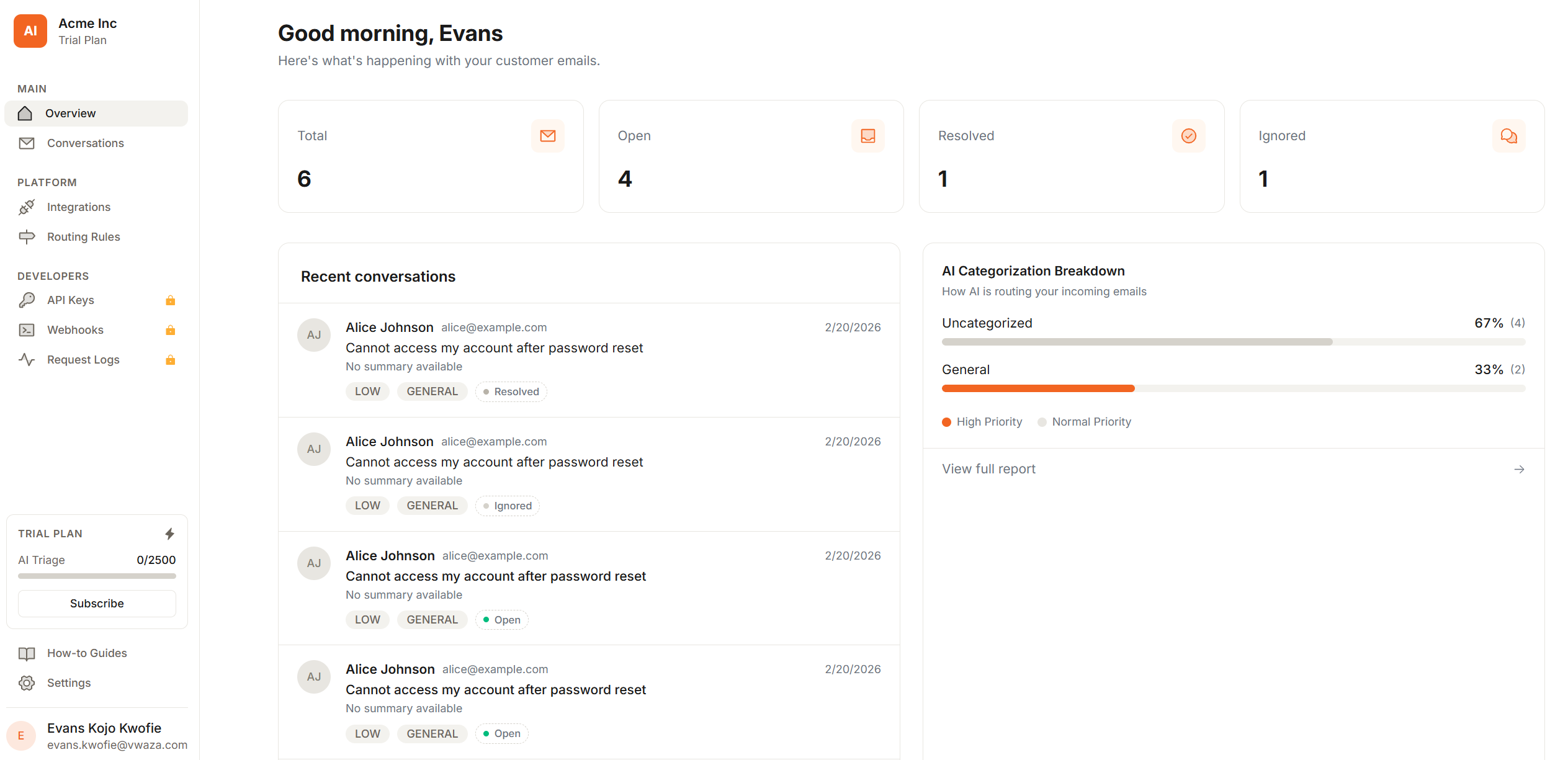
AI reads and classifies
Our AI reads every email and automatically extracts the intent, category, urgency, and sentiment before anyone sees it.
03
Routed to the right tool
Each email lands in the right place based on rules you set once. A Slack channel, a Discord thread, a Linear issue, a ClickUp task.
04
Your team responds
Discuss in thread, reply to the customer, and mark it resolved. No inbox switching, no lost context, no dropped tickets.
Features
Your team responds faster. Nothing falls through the cracks.
Built for small-to-mid SaaS teams that want structured email support without enterprise helpdesk software.
AI triage, zero config
Our AI reads every email and extracts category, urgency, and sentiment automatically.
Slack & Discord native
Emails become rich messages in the exact channels your team already uses — with full context attached.
Smart routing rules
Set default channels per category. Override by domain, subject keyword, or AI label.
Full conversation history
Every thread stored with customer details, AI classifications, and reply history. Fully searchable.
Webhooks & REST API
Fire real-time events to your own systems. Build on MailBridge with a clean developer API.
Your customers' data stays private
Financial data and sensitive information are stripped before AI processes any email. Your customers are protected.
Shared team inbox
Everyone sees the same conversations, routing context, and resolution status. No forwarding required.
Predictable costs, always
You get a warning at 80% of your limit so you're never caught off guard. No surprise overages, ever.
AI Triage
AI reads every email. Your team just responds.
MailBridge uses frontier AI models to classify every incoming email. No rules to write, no training required.
Intent extraction
Understands what the customer actually wants — not just keywords. Bug report vs. refund request vs. feature ask.
Category & urgency
Classifies into Bug, Billing, Feature Request, General, or Spam — and scores urgency from LOW to BLOCKER.
Sentiment detection
Knows when a customer is frustrated before your team does. Negative sentiment emails get flagged for fast response.
Follow-up Reminders
Open issues don't get forgotten.
MailBridge nudges your team when a bug or feature request is still open — right in the Slack or Discord thread where it was triaged.
Reminders in your existing channels
No new tools to check. The reminder threads directly under the original triage message in Slack or Discord.
You set the timeline
Choose how many days before a reminder fires. Turn it off entirely if you don't need it.
Bugs and feature requests only
Reminders only fire for issues that warrant follow-up — not every email, not general questions.
🔴 Critical — Dashboard crashes on export
From: [email protected] · Bug · Priority 9/10
🔔 Follow-up reminder: This 🐛 Bug Report is still open. Has it been addressed?
Fired after 3 days · Configure in Settings → Notifications
Routing
The right email, in the right channel, every time.
Define routing rules once. MailBridge applies them to every email automatically — with a sensible default fallback.
Category-based rules
Send Bug reports to #bugs, Billing questions to #billing, Feature requests to #product. Simple, effective.
Default channel fallback
Emails that don't match any rule go to your configured default channel. Nothing gets lost.
Urgent notifications
Toggle @channel pings for urgent emails per rule. BLOCKER emails never sit unread.
Routing Rules
Status
AI Category
Channel
Actions
Emails without a matching rule are sent to your default channel #support. Change this in integration settings.
Knowledge Base · Auto-Reply
Your inbox answers itself.
When a customer asks something your docs already cover, MailBridge finds the answer and replies automatically — no human needed.
Searches your knowledge base first
Every inbound email is checked against your KB before routing. If the answer is there, it gets sent.
Only replies when it's confident
If the KB doesn't have a clear answer, the email routes to your team as normal. No hallucinated replies.
Cites the source
Every auto-reply links back to the exact KB document it used — visible to your team in Slack or Discord.
Incoming email
How do I set up routing rules?
from: [email protected]
Built for modern SaaS teams, not enterprise committees.
We built MailBridge because shared inboxes are chaos and helpdesk software is overkill. There should be something in between — and there is.
Feature
MailBridge
Shared inbox
Helpdesk software
Setup time
Days of email forwarding rules
Weeks of onboarding
AI triage
None
Add-on, expensive
Slack / Discord
Manual copy-paste
Zapier workaround
Routing rules
Manual labels
Complex rule editor
Webhooks & API
None
Yes, but complex
Price
Free but chaotic
$50–300/month/agent
Target team size
Any (poorly)
50+ (overkill for small teams)
Pricing that doesn't punish growth.
No permanent free tier — just an honest 10-day trial with full Professional access. No credit card required. Pay for what your team actually uses.
Starter
Getting started with structured support.
What's included
- 1,000 emails / month
- 1 Slack or Discord workspace
- AI triage & classification
- AI-drafted reply suggestions
- Sentiment & priority scoring
- Reply to customers from dashboard
- Routing rules
- Email support
Growth
Multiple channels, more volume.
What's included
- 1,500 emails / month
- Up to 3 platform integrations
- Slack or Discord routing
- AI triage & classification
- AI-drafted reply suggestions
- Sentiment & priority scoring
- Reply to customers from dashboard
- Linear & ClickUp dispatch
- Enhanced routing rules
- Priority email support
Professional
Unlimited integrations, API access, full control.
What's included
- 4,000 emails / month
- Unlimited inbox integrations
- Slack + Discord simultaneously
- AI triage & classification
- AI-drafted reply suggestions
- Sentiment & priority scoring
- Reply to customers from dashboard
- Linear & ClickUp dispatch
- Custom sending domain
- Advanced routing rules
- Webhooks & REST API
- API keys
- Priority support
Need higher volume, SSO, a custom LLM, or a dedicated SLA? Talk to us →
MailBridge made our support inbox feel like a system instead of chaos. I especially like their knowledge base, which has allowed us to put answering repeat questions and questions already captured on our FAQ and documentation pages on autopilot. We can now route every customer email to the right place, keep the team aligned, and actually focus on growing the business.
Joel Ngozo
Founder · vwaza.com
Start handling support like a system
Join teams who've already turned their inbox chaos into a clean, fast, collaborative workflow.
10-day trial · Full Professional features · No credit card
What counts as an email?
Every inbound email forwarded to your MailBridge address counts as one message. Bounces, auto-replies, and spam flagged by our AI do not count toward your limit.
What happens when I hit my monthly limit?
You'll receive a warning email when you reach 80% of your limit. At 100%, incoming emails are queued but not triaged until the next billing cycle or until you upgrade. No emails are lost.
Do I need to write routing rules for it to work?
No. MailBridge works out of the box with a single default channel. Routing rules are optional — you add them when you want finer control over where specific categories land.
Can I use both Slack and Discord at the same time?
Yes, on the Professional plan. You can connect multiple workspaces and route different categories to different platforms simultaneously.
Is the AI reading my customer emails?
Yes, that's how triage works. We use frontier AI models to classify emails. Financial data, health information, and other sensitive PII are stripped before the model processes any email. We don't store raw model inputs.
Can I change or cancel my plan anytime?
Yes. You can upgrade, downgrade, or cancel from your billing settings at any time. Cancellations take effect at the end of your current billing period.
What's the difference between Starter, Growth, and Professional?
Starter is built for single-team setups, Growth is for multi-workspace teams, and Professional unlocks unlimited integrations plus API/webhooks and priority support.
Do you offer refunds?
We offer a 10-day free trial so you can validate the product before paying. We don't offer refunds on completed billing periods, but we're human — reach out and we'll sort it out.